A recorder for Apple Watch and iPhone
Tap your wrist. It's recording.
Team Recorder records meetings on the Apple Watch and iPhone you already own. Free. No account.
On the Watch, one tap on the mic (or a double tap on the screen) starts a take. Here, press the crown model or the button to try it. Press again to finish.
Illustrative sample take, recorded for this page. Not a customer recording.
Ember Go on. Press it. Nobody gets a copy but you.
The recorder you already wear.
No device to buy. Nothing new to charge. No sign-in. No plan.
Tick what the other ways ask of you. Our pile stays empty.
Ember I checked. The pile on our side is just desk.
Wrist to pocket, with a receipt.
Recordings made on Apple Watch move to your iPhone with a verified checksum receipt, so you know the copy arrived intact.
The Watch also works on its own when your iPhone is not nearby.
- Record on the wrist
- Tap iPhone sync
- Ready on iPhone
Ember Drag the take across. Watch the receipt print.
Scrub to the decision.
On iPhone, Transcribe & draft writes a summary, action items, decisions and open questions on the phone. Every suggestion quotes its source so you can check it.
Transcripts need iOS 26 on a supported iPhone, in English. Drafts need Apple Intelligence.
Sample meeting. Illustrative, not a real recording.
Team Recorder in 36 seconds
Ember Every marker shows the line it came from. No guessing.
What you record stays here.
Recordings, transcripts and notes never leave your devices.
Seal the take, then try to send it. The counter watches every request this page makes from the moment you seal.
Ember I'm watching the wire with you. It stays quiet.
Where the take happens.
Pick a moment. The desk changes its light.
Two minutes after the meeting, the real decision. Raise the wrist.
Illustrative sample take, recorded for this page. Not a customer recording.
Photos: Vitaly Gariev, Dylan Gillis, Ronnakorn Triraganon, Christina @ wocintechchat.com (Unsplash License).
Ember Tap a print. I'll move the lamp.
Read it at any size.
Team Recorder follows the text size you set on your iPhone, with readable tab names at the largest accessibility sizes.
Drag the dial: this page and the app screen grow together.
Add a title, private notes and your own action items.
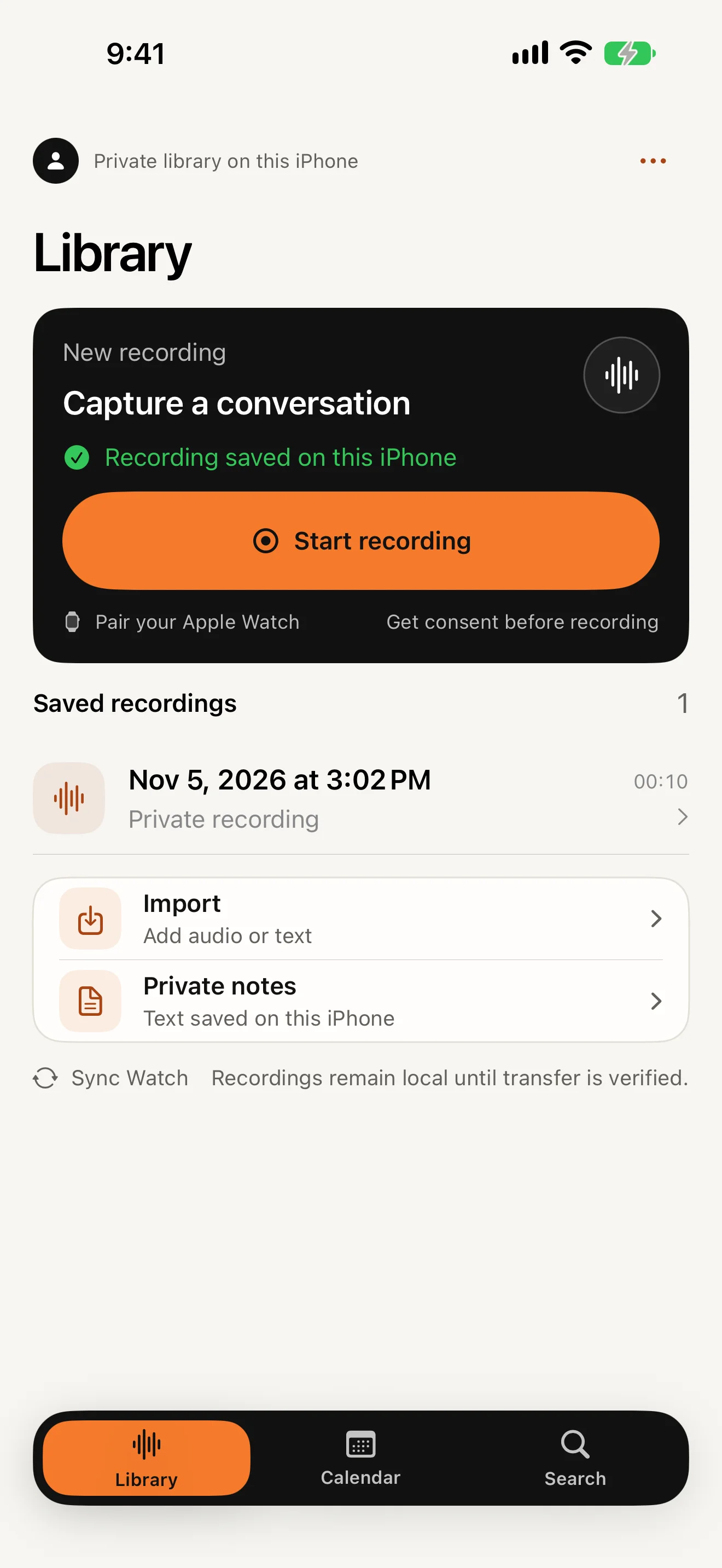
Ember Bigger is fine. Nothing gets cut off.
What it doesn't do.
Said plainly, so you can decide.
Ember Every card here is true today. We'll change them when that changes.
Same job. Nothing to carry.
Prices from each company's own page, with the date we read them.
- Plaudcheapest device + Pro plan
- Otter Pro$8.33/month billed annually
- Granola Business$14/user/month, one user
- Team Recorderfree; uses the Watch and iPhone you own
Illustrative three-year totals use the assumption printed beside each line. Prices are US list prices on the companies' own pages on the date shown and can change. Plaud was read on 2026-11-03. Trademarks belong to their owners; named for identification only.
- Team Recorder Device: No (Apple Watch and iPhone you own). Audio: On your iPhone. apps.apple.com/us/app/id6815457327, read 2026-11-16
- Plaud (Note, Note Pro, NotePin S) Device: Yes. Audio: Cloud ("all data is transferred to the cloud for processing"). plaud.ai, read 2026-11-03
- Otter Device: No. Audio: Cloud. otter.ai/pricing, read 2026-11-16
- Granola Device: No. Audio: Cloud; audio deleted after transcription. granola.ai/pricing, read 2026-11-16
Ember Facts only. You do the judging.
Asked at the desk.
Ember Pull a card. Any card.
Seal your own.
Name the meeting you're about to have. We'll seal it here, in this browser only. Nothing is sent.
Get Team Recorder
Free. No subscription, no in-app purchases.
Apple Watch with watchOS 10 or later. iPhone with iOS 17 or later.
Recordings, transcripts and notes never leave your devices.
Ember That one's yours. I won't peek.